
The Product · Tasks Diary
The diary on your desk — now it carries itself forward.
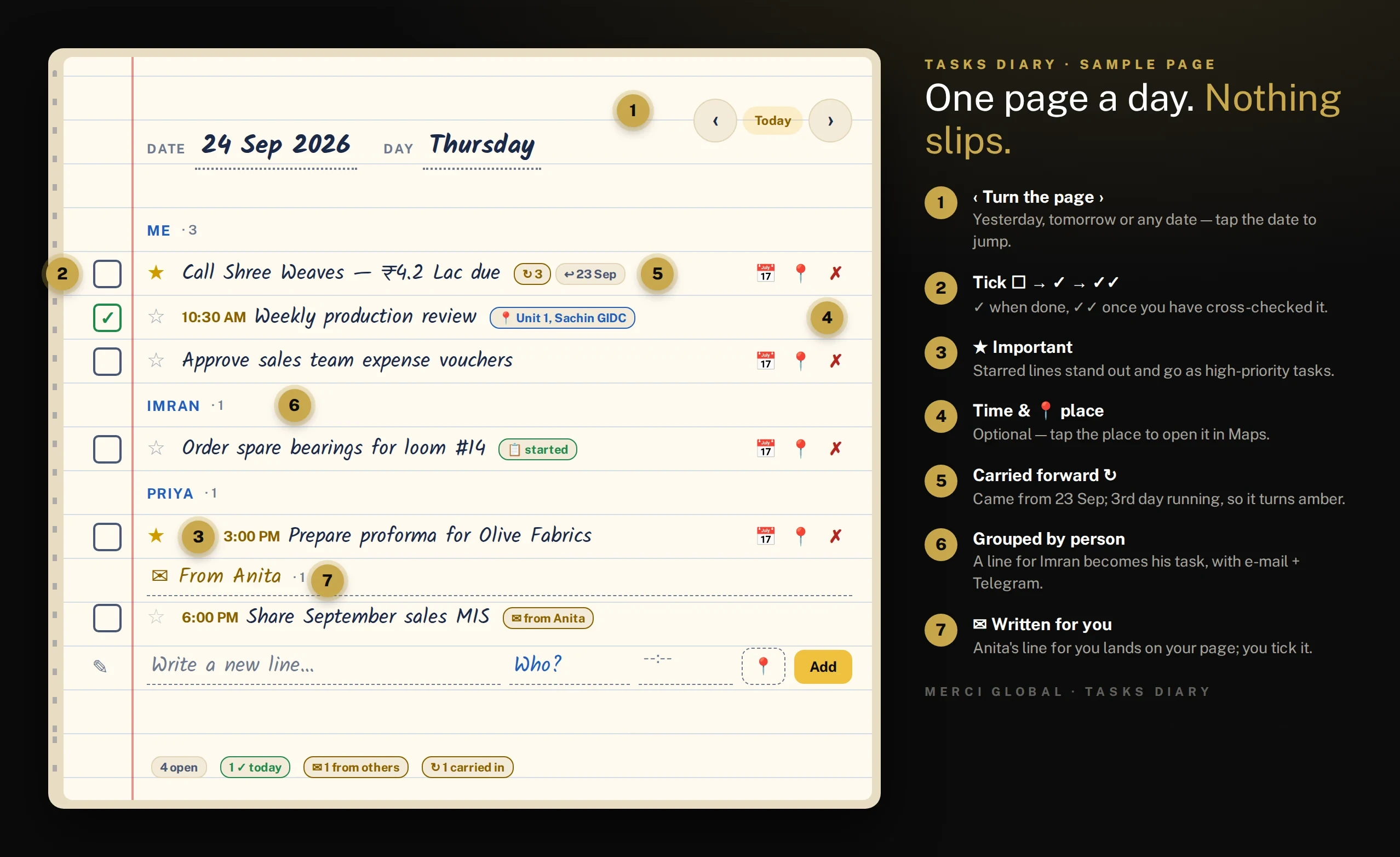
One page a day. One line per job. Tick ✓ when it is done, ✓✓ once you have checked it. Whatever is still open tonight is on tomorrow's page by morning, and a line written for a colleague lands in their diary as a real task. Every past page stays as a record of what really happened.
Works in any phone browser · each person gets their own diary · Telegram reminders
How it works
From a line to a closed job — and a record of the day.
Try it · sample data
Turn the pages of a real-looking diary.
This is Rohan's diary (a director) with a few days of sample lines. Go back with ‹ to see what was carried, ticked and dropped; go forward › to a page planned ahead. Tick a box, write a line for Priya, then switch to Priya's diary to see it arrive. Run tonight's carry-forward to watch open lines move. Nothing here is saved — it is your sandbox.
Tap a box to tick it, ‹ › (or swipe / ← →) to turn the page, or write a line for someone.
Item carry-forward (c/f)
No more re-writing yesterday's list.
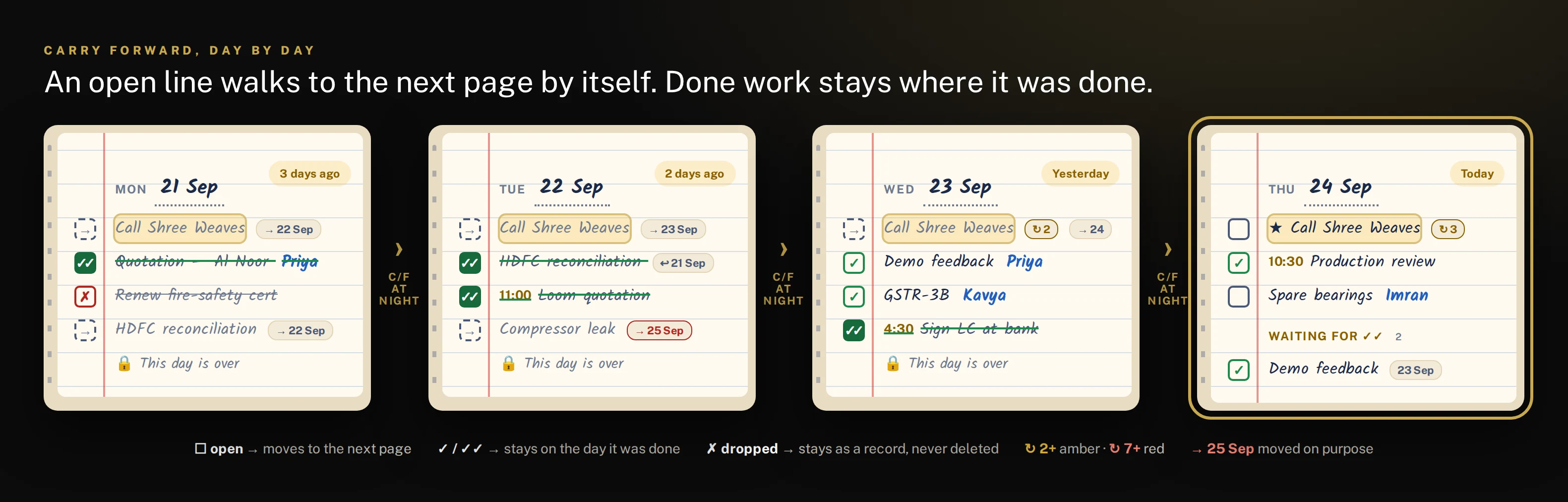
On paper, every unfinished job has to be copied onto the next page by hand — and the ones that don't get copied are forgotten. The Tasks Diary does it overnight: each open line walks to the next page, keeps its person, time, place and star, and counts how many days it has been waiting.
- Only ☐ open lines move — ✓, ✓✓ and ✗ stay on the day they happened
- The page it left says “→ 25 Sep”; the new page says “↩ 24 Sep” — tap either to jump
- ↻ counts the days: amber from 2, red from 7
- Moving a line on purpose leaves a red pointer, so a delay is never hidden
- Didn't open the diary for a week? Everything open is waiting on today's page
Back-dated pages
Every past page is an honest record.
“When did we send that quotation?” “Who was supposed to fix the compressor?” Turn back to the day and it is there — what was written, who it was for, what was ticked and verified, what was dropped, and where each unfinished line went next. A page whose day is over is locked — no new lines and no tick, untick or ✓✓ — so nobody can quietly rewrite the past.
- ‹ › arrows, swipe or ← → keys — the page curls from its corner
- Tap the date on the page to jump to any day in one step
- The “Yesterday / 3 days ago” pill takes you back to today
- 🔒 Closed days: locked, read-only, with a shortcut to today's page
- Search every page by word or place
- ✓✓ Send quotation — Al Noor Trading · Priya
- ✗ Renew fire-safety certificate (already done)
- → Call Shree Weaves carried to 22 Sep
- ✓✓ 11:00 AM Review loom quotation · 📍 Sachin GIDC
- ✓✓ Reconcile HDFC bank · Kavya · ↩ 21 Sep
- → Fix compressor leak moved to Fri 25 Sep (red)
- ☐ 3:00 PM Board meeting — Q2 numbers · 📍 Head office
- ☐ Fix compressor leak · Imran · ↩ 22 Sep
- Future pages accept lines — plan ahead
Shared lines
Write it once. It's in their diary too.
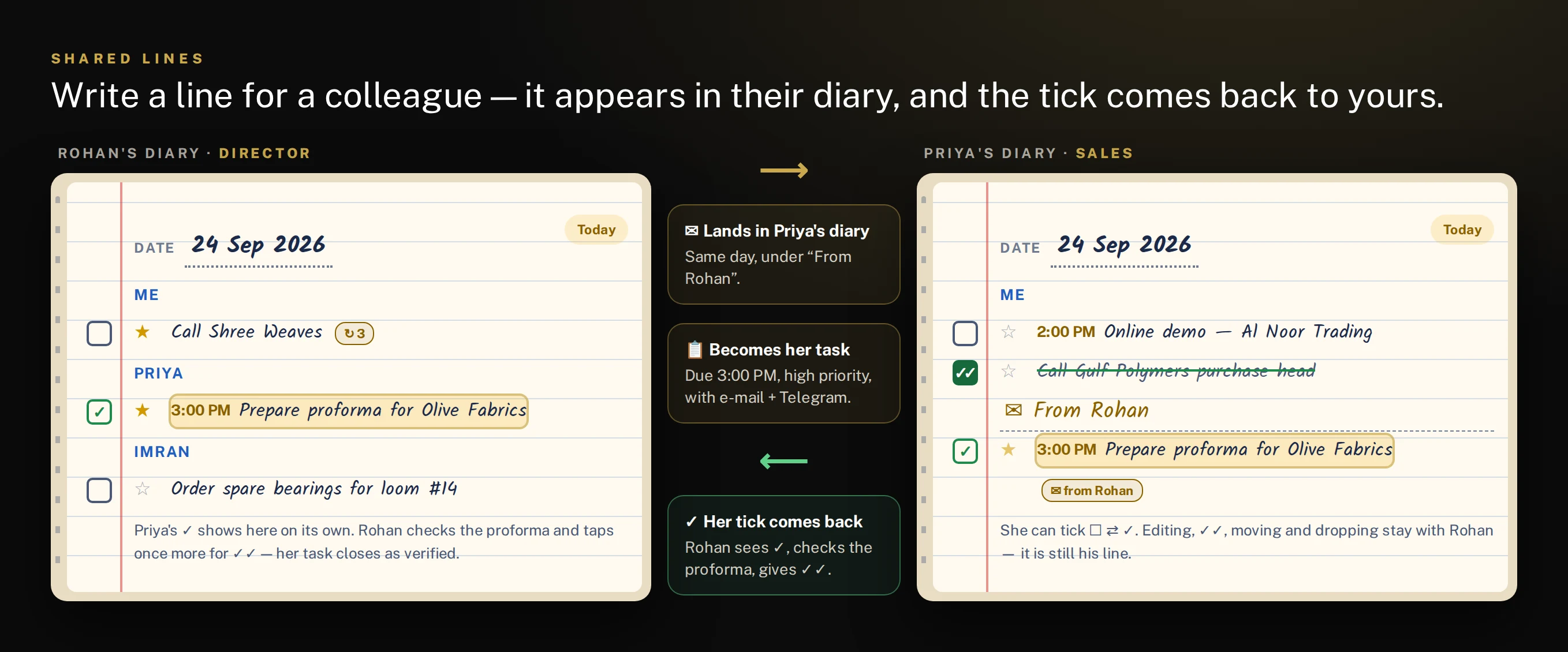
Put a colleague's name on a line and it appears on the same day in their diary, under “✉ From your name”. It also becomes a real task in Task Management — due that day (at the time you gave), high priority if starred — and they get an e-mail and, at once, a Telegram message with the day, the time and the 📍 place (with a Google Maps link).
- They tick ✓ in their diary → your line shows ✓ and waits for your ✓✓
- Done in Task Management counts too — the diary follows the task
- Editing, moving, dropping and ✓✓ stay with you — it is still your line
- Carried forward together: it moves in both diaries at once
- Re-assign it and the new person is told; drop it and their task is cancelled
- Gave it a time? You both get a ⏰ Telegram reminder an hour before
On Telegram
They hear about it at once — and again an hour before.
No one has to open the diary to know a job was given to them. Write a line for a colleague and it reaches their Telegram straight away. Give any line a time and, one hour before, a reminder goes to you and to the person it is for — with the 📍 place and a Google Maps link, so a field visit starts with directions in hand.
The moment Rohan writes it
📔 New diary entry for you
★ Visit Olive Fabrics — sign the PO
Carry two copies of the quotation.
🗓 Fri, 25 Sep · ⏰ 3:00 PM
📍 Sachin GIDC, Surat
🗺 Open in Google Maps
✍ From Rohan
📋 Also in your Tasks
📔 Open diary
2:00 PM — one hour before
⏰ Diary reminder
★ Visit Olive Fabrics — sign the PO
Carry two copies of the quotation.
🗓 Fri, 25 Sep · ⏰ 3:00 PM
📍 Sachin GIDC, Surat
🗺 Open in Google Maps
Starts in 1 hr — at 3:00 PM
✍ From Rohan
📔 Open diary
Sample messages. The hour-before reminder goes only while the line is still ☐ open; a line written less than an hour ahead is reminded at once, and a line moved or re-timed is reminded again for its new slot.
Practical use
A day with the Tasks Diary.
- 9:00 AM
Morning list on Telegram
- Today's open lines and lines written for you — before you reach the office.
- All day
Write as it comes
- A call to make, a visit, a payment to chase — one line each, as fast as a pen.
- Put a colleague's name on it and it is on their page (and in their tasks) instantly.
- Add a time and 📍 place for meetings and visits.
- 1 hr before
⏰ Timed reminder on Telegram
- Every line with a time pings you — and the colleague it is for — an hour ahead, with the 📍 place and a Google Maps link to get there.
- As work finishes
Tick ✓
- Tap the box. Colleagues tick their own lines from their diary — you see it in yours.
- Evening
Cross-check ✓✓
- Check today's ✓ lines and tap once more. At midnight the page locks — its ticks become final.
- Overnight
Carry forward
- Whatever is still ☐ open moves to tomorrow, with ↻ counting the days. Nothing is lost, nothing is re-written.
Directors & owners
Write the day's follow-ups for the team straight into the diary. Ticks come back on their own; ✓✓ on today's page is your evening review.
Sales & field staff
Visits with time and 📍 place, calls to return, quotes to send. The morning Telegram list is the day's plan.
Supervisors & production
Machine jobs, spares, dispatches — lines that slip show ↻ and turn amber, so nothing quietly rots.
Accounts & admin
Returns, reconciliations, payments to chase. Back pages show exactly when each one was done.
Everything included
Paper's simplicity. None of its gaps.
One page per day
A real Date / Day header and ruled lines, like the diary on your desk. Once a day is over its page is locked — no new lines, no tick changes — so the record stays honest.
‹ Previous · Next ›
Turn pages with the arrows, a swipe or the ← → keys; the page curls from its corner. Tap the date to jump straight to any day.
Automatic carry-forward
Only open lines move. Each page keeps a "→ 25 Sep" pointer, the new page shows "↩ 24 Sep", and ↻ counts the days carried.
Stuck-work alarms
↻ 2 days turns amber, ↻ 7 turns red — the jobs that keep slipping stand out without a report.
Grouped by person
Me first, then each colleague A–Z. Tap a name to write the next line for that person.
Shared with the team
A line for a colleague lands in their diary under "✉ From you" and becomes a real task, due that day.
Instant Telegram to them
The moment you write a line for a colleague, it reaches their Telegram — the job, the day, the time, the 📍 place with a Google Maps link, and who wrote it.
Two-way ticks
When they tick ✓, your line ticks too. Reopen it and their task reopens. Only you can give ✓✓.
★ Important
Star a line to make it stand out; a starred line sent to a colleague goes as a high-priority task.
Time & 📍 location
Optional time for meetings, and a place typed in or taken from your phone's GPS — one tap opens it in Maps.
Move to a date
Push a line to another day on purpose. The old page keeps a red pointer, so you can always see why it moved.
Never deleted
A mistaken line is dropped ✗, not erased. The diary is a trustworthy record of every day.
Telegram reminders
Morning and evening lists, a 🔔 reminder on any single line, and an automatic ⏰ reminder one hour before every timed line — to you and to the person it is for.
Search & person view
Find any line by word or place, or see everything open with one person across all days.
Upcoming & month view
Plan ahead on future pages, and see the month's ticks, carries and drops at a glance.
Private to each person
Everyone gets their own diary. You see your lines and the lines written for you — nothing else.
Good to know
Questions people ask.
What if I forget to open the diary for a few days?
Nothing is lost. Every open line is carried to today's page with its ↻ count — you pick up exactly where you left off.
Can I add a line to yesterday's page?
No — a day that is over is a closed record. New lines go on today's page, or on any future page when you plan ahead.
Can I change a tick on yesterday's page?
No. At midnight the day's page locks: ✓, ✓✓ and ✗ stay exactly as they were, and nothing on it can be edited, starred or moved. Unfinished ☐ lines are carried to today, where you can still tick them.
I wrote something by mistake. Can I delete it?
Drop it with ✗. It stays on the page struck through, and can be restored — the diary never loses a line.
What does my colleague see when I write a line for them?
The same line on the same day under "✉ From <your name>", plus a task with e-mail and an instant Telegram message (with the time and 📍 place, if you gave them). They can tick it; editing, moving and ✓✓ stay with you.
Will I be reminded before a meeting or visit?
Yes. Give the line a time and, one hour before, a ⏰ Telegram reminder goes to you and to the colleague it is for — with the line's details, the 📍 place and a Google Maps link. Written less than an hour ahead? It is sent straight away. Ticked ✓ already, or the time has passed? Nothing is sent.
How do I find what happened last week?
Turn back with ‹, tap the date to jump, or search. Each page shows what was ticked, verified, dropped and carried that day.
Give every person a diary that never loses a line.
Works alongside Merci Task Management — ask us to set it up for your team.